Tenant FAQ
Common questions about renting with Galavier Group — applications, payments, maintenance, and more.
Watch: How to apply and what to expect at move-in (2 min video)
A walkthrough of the online application, the documents to have ready, and what you need at move-in.
How do I apply for an apartment?
You can apply online at galaviergroup.com/application. The application covers your personal information, employment history, rental history, and references. A non-refundable application fee is required to process your application.
What documents do I need to apply?
Plan to have the following ready:
- Government-issued photo ID (driver's license or passport)
- Recent pay stubs or proof of income (last 2–3 months)
- Bank statements (last 2 months)
- Landlord references and contact information
- Social Security Number for the credit and background check
Is there an application fee?
Yes. A non-refundable application processing fee is required at the time of submission. The amount will be stated on the application form and covers the cost of the credit and background check.
How long does the approval process take?
Most applications are reviewed within 2–5 business days after we receive all required documents. We'll contact you by email with the decision or if we need additional information.
What is required at move-in?
Before receiving your keys you'll need to provide:
- Signed lease agreement
- First month's rent
- Security deposit (typically one month's rent)
- Proof of renter's insurance
Move-in funds are typically required via certified check or bank transfer — personal checks are not accepted at move-in.
Do I need renter's insurance?
Yes. Renter's insurance is required for all tenants. Your policy should name Galavier Group LLC as an additional interested party. Minimum liability coverage and specific requirements will be provided with your lease.
Watch: How to pay rent (2 min video)
When rent is due, how to pay by Zelle, where to see your balance and history, and what to know about late fees.
When is rent due?
Rent is due on the 1st of each month. Please refer to your lease agreement for the exact due date and any grace period that may apply.
Is there a grace period for late payments?
Your lease specifies whether a grace period applies. After the grace period ends, a late fee is assessed. Consistent late payments can affect your lease renewal. If you anticipate a problem, contact us before the due date — we appreciate proactive communication.
How do I pay rent?
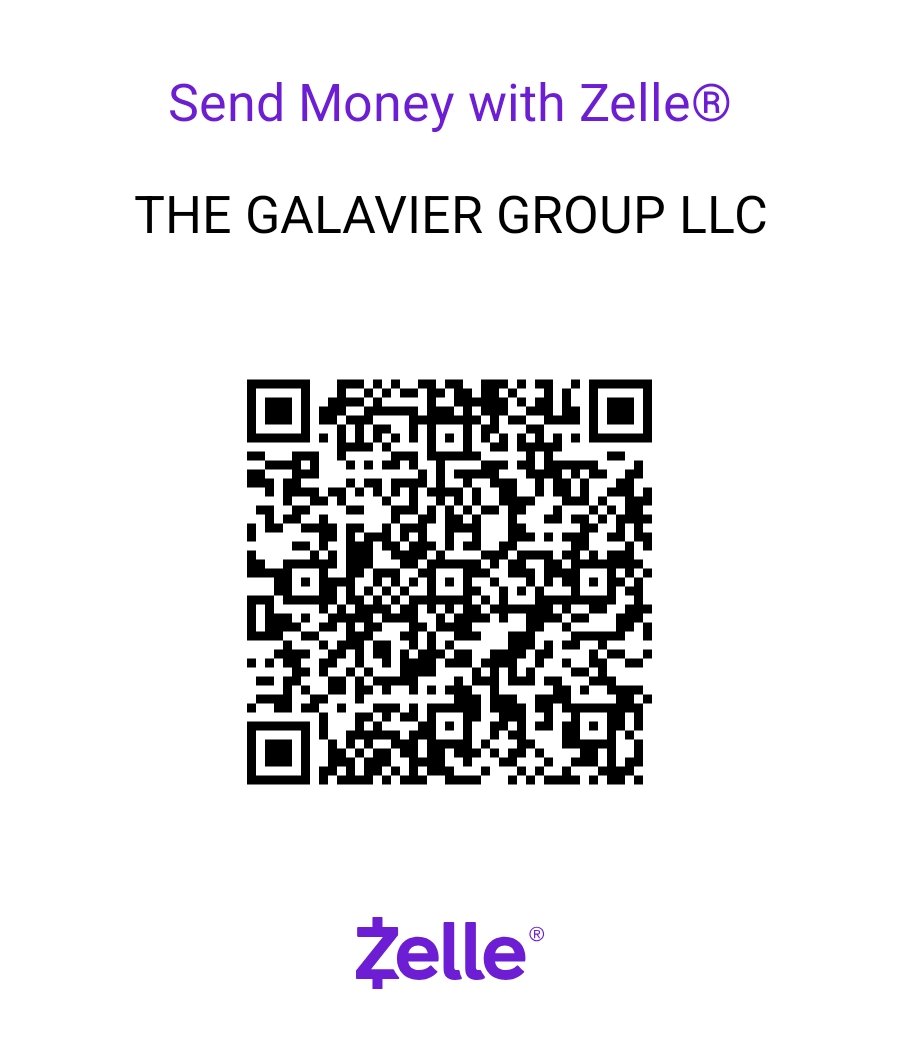
Scan to pay by Zelle (THE GALAVIER GROUP LLC)
Rent can be paid via Zelle to Payment@galavier.com. Additional payment instructions and account details are included in your welcome packet and are available through the tenant portal. Contact us at info@galaviergroup.com if you have any questions.
Can I set up automatic rent payments?
Yes. Most major banks allow you to schedule recurring Zelle payments. We recommend setting the payment date a day or two before the due date to account for any processing delays. Contact your bank for instructions on setting up recurring transfers.
What happens if I pay late?
After the grace period specified in your lease, a late fee will be applied to your account. Repeated late payments are noted in your rental history and can affect lease renewal. If you are experiencing financial hardship, please reach out to us as soon as possible.
What's the maximum late fee under New York law?
New York's Housing Stability and Tenant Protection Act (HSTPA) limits how much a landlord can charge for late rent:
- The cap is $50 or 5% of your monthly rent — whichever is less.
- A late fee can only be charged if rent remains unpaid more than 5 days after the due date.
- Galavier Group follows these limits — we will never charge more than the law allows.
If you know you're going to be late, please reach out before the due date. We'd rather work something out than add fees to your balance.
How do I get a rent receipt or payment confirmation?
Zelle sends a confirmation to both sender and receiver for each transaction. You can also log into the tenant portal to view your account balance and recent transactions. If you need a formal receipt, email us at info@galaviergroup.com.
Watch: How to submit a maintenance request (2 min video)
A step-by-step walkthrough: sign in, fill out the request, add photos, and track its status.
How do I submit a maintenance request?
Log into the tenant portal and go to the Maintenance section. Fill out the form with the issue type, urgency level, and a description. You can also attach photos. We review all requests and prioritize by urgency.
Watch: How to schedule a repair visit (3 min video)
A step-by-step walkthrough: see when your provider's times are posted, pick a day and time, confirm, and change or cancel your visit.
How do I pick a time for my repair visit?
Once we assign a service provider to your request, a Pick a time box appears on the request in the tenant portal under Maintenance → Your Requests. The provider posts the days and times they are available. Choose a day, tap a time, and press Confirm this time. Your request is scheduled right away, and you, the provider and our office get a confirmation by email (and a text where enabled).
If the provider has not posted times yet, the box says Waiting for available times. We email you as soon as they do.
Can I change or cancel my repair visit?
Yes, up to 24 hours before the visit. Open the request in the portal and press Change time to pick another of the provider's open times, or Cancel visit to give the time back. Your old time opens up for others, and you can pick a new one later.
Within 24 hours of the visit, please contact us instead so the provider is not left waiting. If the provider cannot make a booked time, they take it back and we email you to pick a new one.
Why can't I pick a time for my urgent or emergency request?
Emergency requests, and any marked Urgent, are not scheduled from a calendar. We arrange them directly so the repair is not delayed. For an emergency, also call or text (347) 209-4435. Other requests are picked by you once a service provider is assigned.
Watch: How to review a completed repair (2 min video)
A step-by-step walkthrough: find a completed request, give your stars, write a few sentences, add photos, and see your review on our Updates page.
Can I review a repair you finished?
Yes. Once a maintenance request is marked completed, a Review this work button appears on it in the tenant portal under Maintenance → Your Requests. Give it 1 to 5 stars, write a few sentences, and add photos if you like. If we feature that repair on our Updates page, your review is shown there as a “Resident review” with your first name and last initial (or “A resident” if you prefer). You can edit or delete your review at any time.
What qualifies as an emergency?
Emergencies are situations that pose an immediate risk to health, safety, or the property. These include:
- Gas leak or smell of gas
- No heat in winter (temperatures below 55°F indoors)
- Major water leak or flooding
- No hot water
- Electrical hazard or sparking
- Broken exterior door lock (security issue)
For emergencies, mark your portal request as "Emergency" and also call or text us directly for the fastest response.
How long will it take to fix my issue?
Response times depend on urgency:
- Emergency: Same day or within 24 hours
- Urgent (affects daily living): Within 2–3 business days
- Routine: Within 5–10 business days
Complex repairs may take longer depending on parts, contractors, or permits. We will keep you updated on status.
What am I responsible for maintaining?
Tenants are generally responsible for:
- Keeping the unit clean and undamaged
- Replacing light bulbs
- Unclogging drains from tenant-caused blockages
- Replacing smoke detector batteries
- Minor wear-and-tear repairs as specified in your lease
Your lease agreement outlines full tenant responsibilities. When in doubt, submit a portal request and we'll advise.
Can I make repairs myself?
Tenants should not perform repairs without prior written approval. Unauthorized alterations or repairs may result in charges being deducted from your security deposit at move-out. Submit a maintenance request and we'll coordinate licensed service.
Watch: How to sign in and use the tenant portal (2 min video)
A quick tour: how to sign in, the 6-digit code, and what you can do in each section.
How do I access the tenant portal?
Go to galaviergroup.com/portal and sign in with the email and password provided when your account was created. The portal gives you access to your documents, maintenance requests, notices, and account statements.
New here? Watch the video above.
Watch: How to sign in securely — set up backup codes and recover your account (3 min video)
The emailed 6-digit code, how to add a backup way to sign in, and how to get back in with I can’t get my code.
What if my sign-in code doesn’t arrive? How do I add a backup way to sign in?
Every sign-in sends a 6-digit code that expires in 10 minutes. If it doesn’t arrive, check your spam or junk folder, then choose Resend code. You can also pick another way below the code box: Text me a code instead, Use my authenticator app instead, or Use a backup code instead.
To turn these on, sign in and open My Account → Extra Sign-In Security. Type your current password, then set up any or all of: text-message codes (confirm your cell phone with a code we text you), an authenticator app (free, works without a signal), and eight backup codes (each works once; print them and keep them somewhere safe). If you can’t use any of them, choose I can’t get my code and confirm your street address and apartment as they appear on your lease. Never share a code with anyone. Galavier Group will never ask you for one.
I forgot my portal password — how do I reset it?
Use the self-service reset on the sign-in page: go to galaviergroup.com/portal, click Forgot password? below the Sign In button, enter your email address, and you'll receive a reset link within minutes. The link expires in 1 hour.
If you don't receive the email, check your spam folder. If you still need help, contact us at info@galaviergroup.com.
The email on my portal account is wrong or doesn't work — how do I fix it?
Email info@galaviergroup.com with your name and the property address. We will remove the old email from your account. Your lease, documents and balance stay exactly as they are. If you don't remember your password, tell us and we will help you set a new one.
Then go to galaviergroup.com/portal and sign in with your full name (or your phone number) and your password. A sign-in code is texted to the phone number on your account. If you can't get it, choose I can't get my code and confirm your street address and apartment as they appear on your lease. If there is no phone number on your account either, you will be asked one more question, the amount of your most recent rent payment, and you will then get access to My Account only until you confirm an email or a cell phone with a code.
Once you are in, open My Account and choose Add Your Email Address. Enter your name, your street address and your apartment exactly as they appear on your lease, then your new email. We send a 6-digit code to that email; type it in to finish. The email is saved only after you enter that code, so double-check the spelling first.
How do I get a copy of my lease?
Open the Leases section of the tenant portal. Every lease on your account is listed there, and each one has a Print lease button that opens your lease as a PDF you can print or save. Past years stay on your account under Lease history. If you need a hard copy or cannot access the portal, email info@galaviergroup.com.
Watch: How to sign your lease online (3 min video)
A step-by-step walkthrough: find the lease waiting for your signature, read the monthly charges, sign it, print it, and find every past lease under Lease history.
How do I sign my lease in the tenant portal?
When your lease is ready, we email you (and text you if you agreed to text messages). Sign in to the tenant portal, open Leases, and choose Review & Sign Lease on any lease under Waiting for your signature. Read the lease, type your full name, tick the box agreeing to sign electronically, and press Sign. You will get an email with the signed copies once management has countersigned.
Everyone named on the lease must sign. If there are two or more tenants, each person signs separately with their own portal account. The lease is complete only after every tenant has signed and management has countersigned. The lease page shows who has signed and who is still waiting.
What are the Service Description and Monthly Charge on my lease?
Your lease shows a table of your monthly charges: your monthly rent, then any additional service charged with it (for example parking or storage), each with a description and a monthly amount, and a Total Monthly Charge at the bottom. The Total Monthly Charge is what you pay each month. The same table is shown on your lease card in the portal.
Can I sign documents electronically?
Yes. Your lease and lease renewals can be signed electronically through the tenant portal. You'll receive an email notification when a document is ready for your signature.
Where do I find my account balance and payment history?
Log into the tenant portal and navigate to the Financials section. There you'll see your current balance, rent due dates, and a record of recent transactions.
Watch: How moving out works (2 min video)
Giving notice, the move-out checklist, the inspection, and how your security deposit is returned.
How much notice do I need to give before moving out?
Your lease specifies the required notice period — typically 30 or 60 days written notice before your intended move-out date. Please check your lease and submit notice in writing to info@galaviergroup.com to ensure it is properly documented.
How does the security deposit work?
Your security deposit is held in a separate account for the duration of your tenancy. It is returned after move-out, minus any deductions for damage beyond normal wear and tear, unpaid rent, or outstanding charges.
What is the move-out inspection process?
After you vacate, we conduct a move-out inspection comparing the unit's condition to the move-in inspection report. We'll document any damages. You may request to be present during the inspection — contact us to schedule a time.
When will I get my security deposit back?
New York law requires that security deposits be returned within 14 days of the end of the tenancy (once the unit is vacated and keys are returned), along with an itemized statement of any deductions. Deposits are returned by check or bank transfer to your forwarding address.
What do I need to do before returning the keys?
Before your final move-out date:
- Remove all personal belongings
- Clean the unit thoroughly (appliances, bathrooms, floors)
- Patch any nail holes and touch up paint if required by your lease
- Return all keys, fobs, and parking passes
- Provide a forwarding address for your security deposit return
- Cancel or transfer your renter's insurance
Can I renew my lease?
We typically reach out 60–90 days before your lease expires to discuss renewal options. If you'd like to renew, contact us early at info@galaviergroup.com. Renewal terms and any rent adjustments will be provided in writing.
Still Have a Question?
Our team is happy to help. Reach out and we'll respond within one business day.